

Primavera P6 MSSQL The database has not been configured to run background jobs
If you ever get this error when installing Primavera P6 Professional, then read on to learn how to fix it. We take you through seven easy steps to address this problem, complete with screen shots. After this, you should have a trouble free instance of Primavera P6 Professional running on your PC using the Microsoft SQL database.
Problem Description
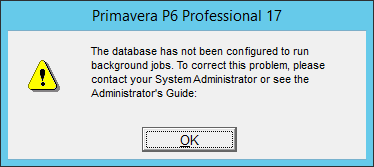
During a new setup of Primavera P6 Professional, the following error was encountered upon first logging in to the new MSSQL Server Database with the P6 Professional client:
Error: The Database has not been configured to run background jobs.
Reason
This happens on MSSQL Server database instances because there is a stored procedure that needs to be run to setup the Job System Monitor (Symon) and the Job Data Monitor (Damon) tools.
Solution
The following steps will allow you to solve this issue.
1. Login to the MSSQL Database using the SQL Server Management Studio.
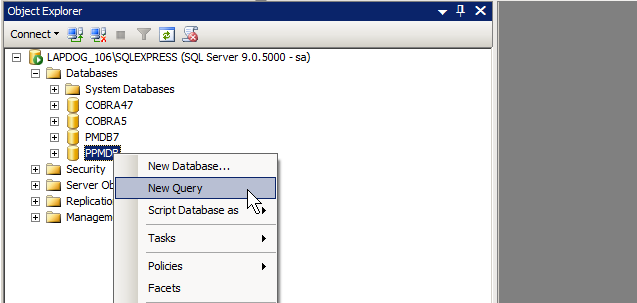
2. Locate the Primavera P6 Database and right-click.
3. Select the New Query option.
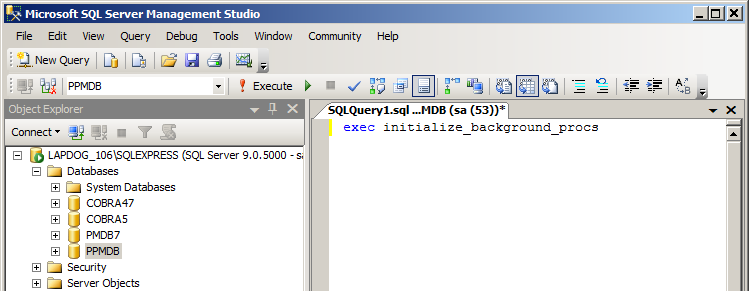
4. In the Query window, enter exec initialize_background_procs and click F5 to execute the SQL statement.
5. This will create the Job System and Data System Monitors.
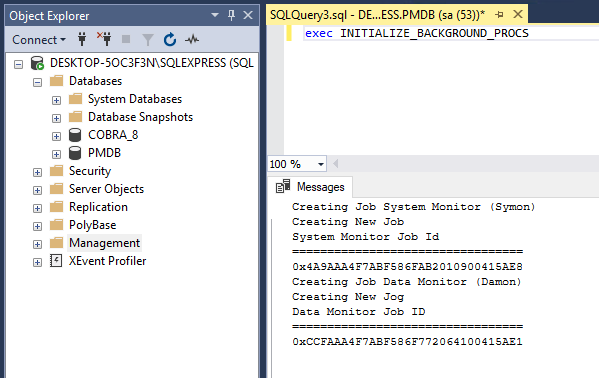
6. No open your windows Services dialog and restart the SQL Server Agent.
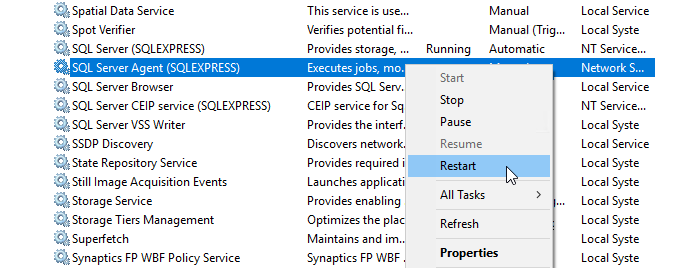
7. When you login to P6 Professional you will no longer see the error message.
If you have encountered this problem and then followed these steps to address it, hopefully you are now up and running with Primavera p6 Professional.