

 Activity dependencies in Primavera P6 are a key element in building a critical path for a project. This process is often referred to as activity sequencing, whereby a logical flow of the work is constructed, as shown in Figure 1 below.
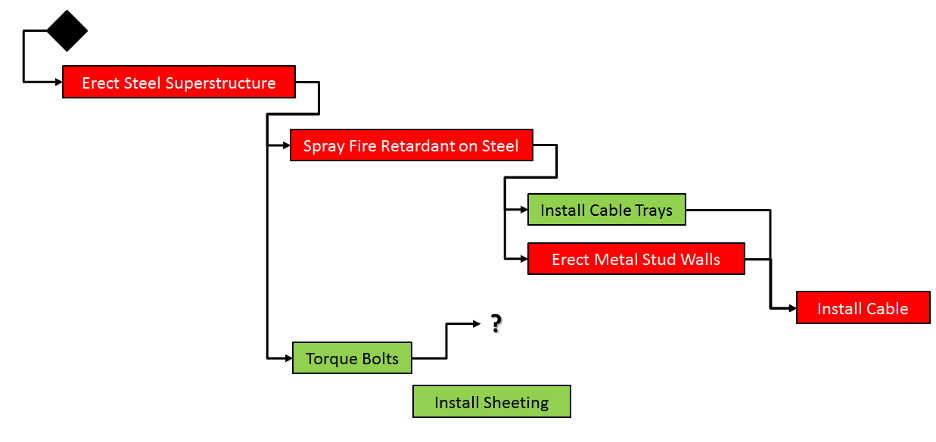 Figure 1
In this article, we will discuss some best-practice methods using activity dependencies in Primavera P6. These can be used to construct a good activity sequence that will help to calculate a robust critical path throughout a schedule. We’ll take a look at the Activity Sequencing Process and what may help to decide the Logical Relationships used in Activity Sequencing, as well as how to determine Activity Dependencies. And, finally, we’ll look at Leads and Lags.
The Activity Sequencing Process
The activity sequencing process takes into account three types of activity dependencies in Primavera P6 that may exist for a project; Mandatory Dependencies, Discretionary Dependencies, and External Dependencies.
Mandatory Dependencies
Mandatory Dependencies are also known as Hard Logic. Examples of Hard Logic are either contractually required items or physical limitations; like walls that cannot be built until the footings are finished.
Discretionary Dependencies
Discretionary Dependencies are also known as Soft Logic. They can be based upon the knowledge of best practices for a specific type of work or fast-tracking/ accelerating a schedule. Soft Logic can be used for a specific sequence desired rather than dictated by hard logic or where other sequences are acceptable.
External Dependencies
External Dependencies include relationships between project and non-project activities like environmental hearings. They are outside of the project team’s control, for example, testing cannot start until equipment arrives from an external source. They can also include other contractors/subcontractor deliverables.
Logical Relationships Used in Activity Sequencing
Primavera P6 supports 4 types of relationships that can be made between activities; Start to Start, Finish to Start, Finish to Finish, and Start to Finish.
Start to Start
The Start to Start relationship is most often used when linking a Start Milestone to the start of a standard activity; however, it can also be used between two standard activities, as shown below in Figure 2.
Activity B cannot start until Activity (or Milestone) A starts
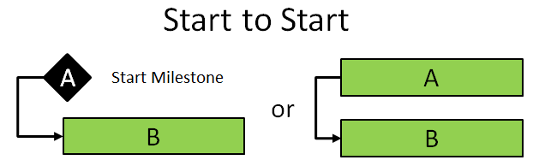 Figure 2
Finish to Start
The Finish to Start relationship is the most common type of relationship used in project schedules, as shown below in Figure 3.
Activity B cannot start until Activity A finishes
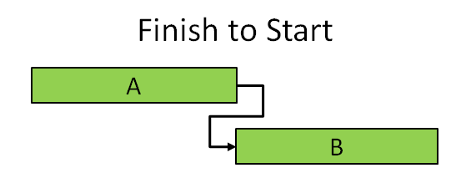
Figure 3
Finish to Finish
The Finish to Finish relationship is often used when linking a standard activity to the end of a Finish Milestone; however, it can also be used between two standard activities, as shown below in Figure 4.
Activity (or Milestone) B cannot finish until activity A finishes
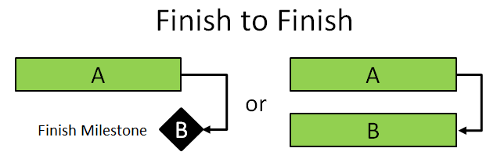 Figure 4
Start to Finish
Start to Finish relationships are rarely used by schedulers. Occasionally they do come in handy, for example, imagine that you are building a facility in an area that has no power. Activity B can be: run a generator to power the site. Activity A can be: turning on a power line to the site, which is being installed while the rest of the project progresses. The generator must run (Activity B) until the power line is powered up (Activity A), as shown below in Figure 5.
Activity B cannot finish until activity A starts
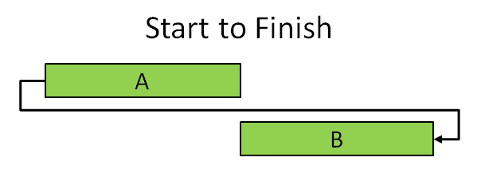 Figure 5
Lags and Leads
Lags
As well as indicating the Relationship Type that exists between two activities, you may also need to model delays or Lags that exist. For example, the first activity is to pour the concrete for a foundation. However, the concrete needs to cure for 5 days before it is of sufficient strength upon which to build a wall. This is a classic example of where a Lag would be used to build that delay into the schedule and ensure that the project doesn’t show an unrealistic finish date that ignores the five-day cure period, as shown below in Figure 6.
Activity B may not be able to start for some time after A finishes
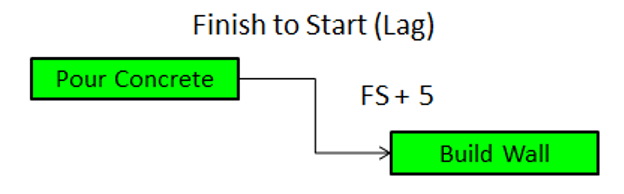 Figure 6
Lead
A Lead is a negative lag.
For example, a trench is being dug and then a pipe is being laid. Because the pipe can be laid in the completed part of the trench and doesn’t have to wait for the entire trench to be dug, a negative Lag is used to stagger the start of the two tasks.
This same scenario can be represented in two different ways; using the Finish to Start relationship and a negative Lead value, or using a Start to Start with a positive Lag value to achieve the same effect, as shown below in Figure 7.
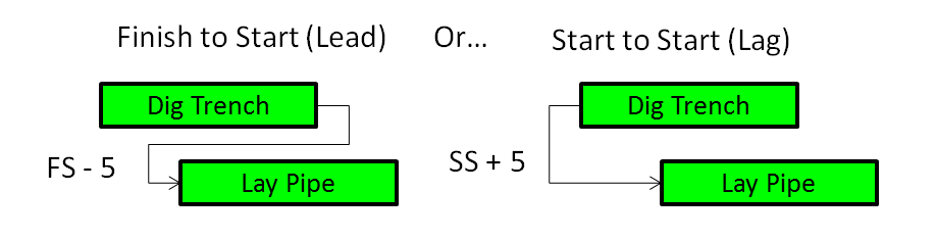 Figure 7
How Do You Determine Activity Dependencies?
We’ve already mentioned the types of dependencies; Mandatory dependencies (Hard Logic), Discretionary dependencies (Soft Logic), and External dependencies. Now let’s look at the different types of activity dependencies in Primavera P6 and discuss when it is appropriate to use them in a schedule.
Mandatory Dependencies (Hard Logic)
Mandatory dependencies occur from two main sources; contractual or physical. Contract dependencies are stipulated by a signoff or approval step that prevents other work starting until that item has been completed to the customer’s satisfaction. This dependency will prevent other parallel work starting, even if it physically could.
The second hard dependency is physical limitations presented by the work itself. These are commonly found in construction and engineering projects where the work is delivering physical deliverables. Consideration should be taken in real-world situations to sort out the most appropriate dependencies between predecessors and their successors.
Discretionary Dependencies (Soft Logic)
Discretionary dependencies are based upon best practice or preferred methods, rather than by hard logic. Discretionary dependencies can prove to be more challenging because what looks right on the schedule may have unforeseen consequences.
Without hard logic as guidance, there is the potential for errors in the workflow and these errors may not come to light until the work is underway. Let’s look at an example of discretionary logic.
On a schedule, there doesn’t appear to be a reason why the steel structure cannot be sprayed with the fire-retardant coating as soon as all the floors and roof installation activities are complete.
However, in reality, it may be better to wait until all the interior walls’ metal studding is in place and the electricians have installed all the hangers for the cable trays, before spraying the fire-retardant. Whilst the interior wall studs and cable trays don’t have any mandatory dependency on fire-retardant spraying, there is some discretionary dependency that allows for a better overall outcome.
Why?
-
- When the metal stud walls are in place, the electricians will have a better understanding of where the cable trays will need to be run.
- The electricians will not have to cut into the fire-retardant coating to install the brackets for their trays.
By spraying the fire-retardant coating after the metal wall studding is installed and the trays are all hung will be more efficient and will prevent the fire coating from being damaged by the electricians and other construction activity.
External Dependencies
External dependencies can have a large impact on schedule dates, but they may not be readily apparent in the planning stage. These are often included as part of a Project Risk Register because they are factors that are usually outside of the project manager’s control.
External Relationships
In Primavera P6 you can create inter-project dependencies that may assist you in planning for external events or items. If a project schedule is dependent on deliverables from another project that is also in Primavera P6, then you can open both projects and link the activities, just like creating relationships within a single project. To create external relationships in Primavera P6, the scheduler must have Read/Write user access to both projects.
In Figure 8 below, Project B cannot start until activity B in Project A is finished. This has placed activity B in project A on the critical path.
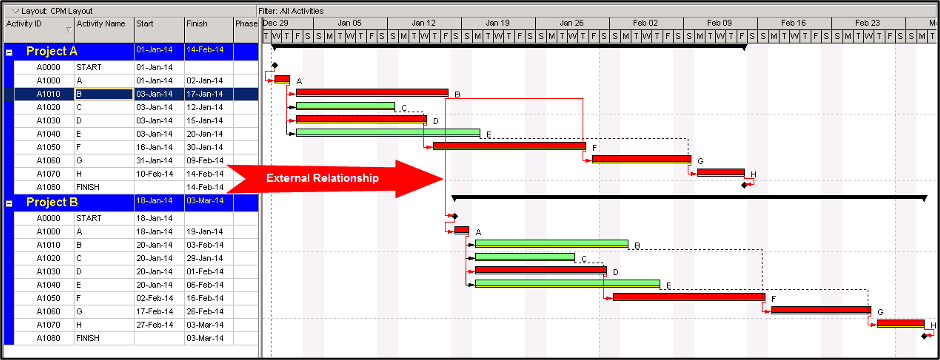 Figure 8
Mandatory Constraints
Mandatory Constraints are required when a contract stipulates a hard start or delivery date. These should be indicated in the Project Milestone list and documented in Primavera P6 using the Notebook topic called Constraint Notes. To access Constraint Notes, in the ‘Activities’ view, select the activity that has the constraint assignment. Click on the ‘Add’ button in the ‘Notebook’ tab and select the ‘Constraint Notes’ notebook topic from the resulting dialog, as shown below in Figure 9.
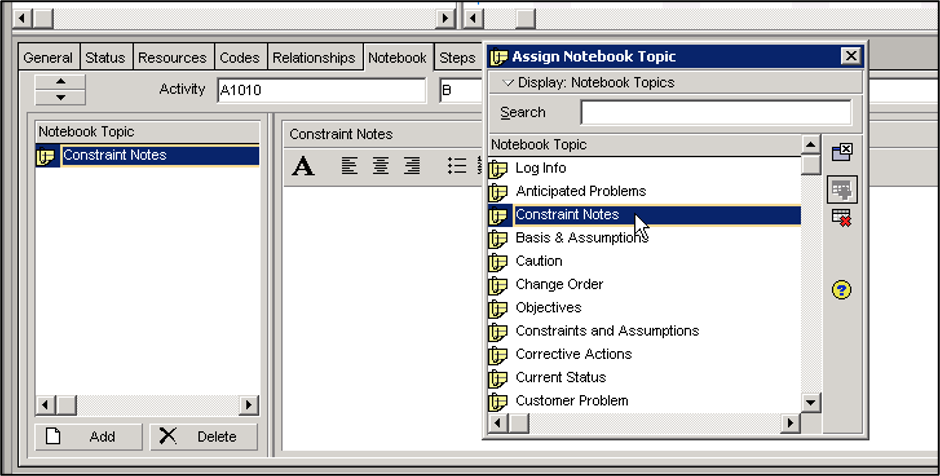 Figure 9
Adding Constraints to Activities
Constraints are added to activities by using the ‘Status’ tab in the ‘Activity’ details on the bottom right-hand side. Select the ‘Activity’ that is to be constrained and then click on the ‘Primary’ field, as shown below in Figure 10.
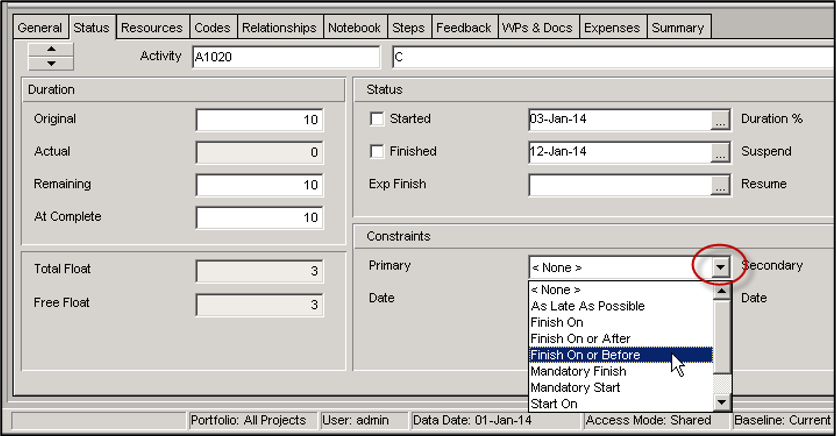 Figure 10
Summary
Hopefully this will help you better understand the typical uses of constraints and activity dependencies in Primavera P6. There are always exceptions to the rule. But these practices will at least give you an idea as to what is considered typical and how to use them. This way, you’ll at least know when and hopefully why, you may need to stray from them.